The Portfolio Infrastructure
Discussion on the infrastructure of the system
1.0 Overview
Building a modern web application requires more than just great code—it demands a reliable, scalable, and well-structured infrastructure. In this blog, I’ll walk you through the architectural design of my Portfolio System’s infrastructure, diving deep into the technologies and strategies that power it.
We’ll explore the source code that defines the infrastructure and discuss the rationale behind key design decisions, from choosing AWS as the cloud provider to managing deployments with Terraform and GitHub Actions. Whether you’re setting up your own infrastructure or just curious about the thought process behind mine, this documentation aims to offer insights, practical tips, and a solid understanding of what goes on behind the scenes. The system leverages the following technologies:
The entire system’s infrastructure is orchestrated using Terraform, with AWS serving as the cloud hosting provider. Terraform’s state files are securely stored in AWS S3 buckets to ensure consistency and traceability. For seamless deployment, I’ve implemented a CI/CD pipeline using GitHub Actions. You can view the source code of this repository here.
2.0 Infrastructure Management - High level Overview
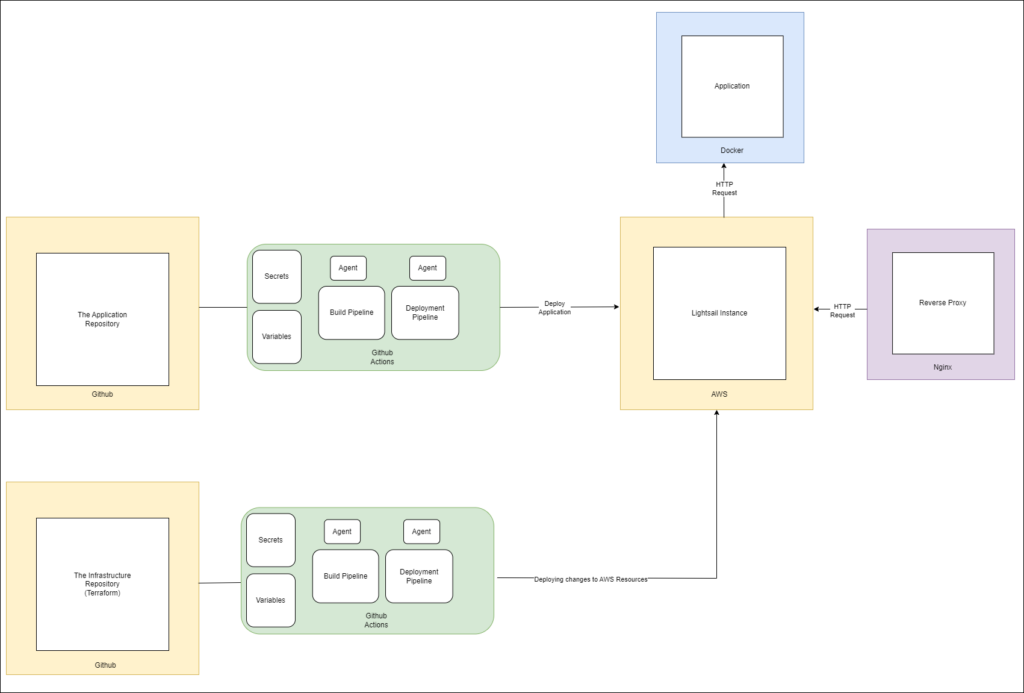
In this section, we’ll explore the high-level infrastructure management strategy for the system. In a typical production-grade application, multiple servers are often deployed to run instances of the same application, ensuring scalability and fault tolerance. Load balancers are used to distribute network traffic evenly, preventing any single server from becoming a bottleneck.
While production-level apps usually rely on multiple servers for maximum uptime and to handle heavy traffic, I’ve kept things lean and mean with a single server. Why? Because this project is all about showcasing how to automate deployments, and a single server gets that point across beautifully!
But don’t worry, this setup is built to scale! Whether it’s one server or a whole army of them, the deployment process remains the same: the exact same code gets rolled out to each server, one after another. This ensures every server is singing the same tune and running the latest version of my portfolio. Adding more servers is as easy as plugging their details into the GitHub Workflow. Now, I know what you’re thinking: “What about downtime during updates?” Large-scale applications often use fancy techniques like Blue-Green deployments to keep things running smoothly. While I’m not using that here, the core principles of this single-server setup can easily be applied to those more complex scenarios. Think of this as a solid foundation you can build upon!
2.1 Infrastructure as Code: Automation to the Rescue!
Okay, let’s break down this “infrastructure as code” thing. It might sound like something only super techy folks deal with, but it’s actually a pretty simple idea. Imagine this: you’ve built an awesome application, but now you need to get it online. Traditionally, that means a whole lot of manual work, especially for larger teams. Think setting up servers, installing software, configuring networks – the list goes on and on!
This is where Infrastructure as Code (IaC) swoops in to save the day! Instead of doing all that tedious stuff by hand, you write code to automate it. Need a new server? Just push a button! Want to update your software? Another button! IaC lets you manage your entire infrastructure with code, making the whole process faster, more reliable, and way more efficient.
Think of it like this: IaC takes all those repetitive tasks and turns them into reusable building blocks. Not only does this free up a ton of time, but it also acts as living documentation for your infrastructure. Plus, with everything automated, you’re less likely to run into those pesky inconsistencies that crop up when you’re doing things manually.
In short, IaC is all about working smarter, not harder. It’s about defining your infrastructure in a clear, repeatable way, so you can focus on what really matters: building amazing applications!
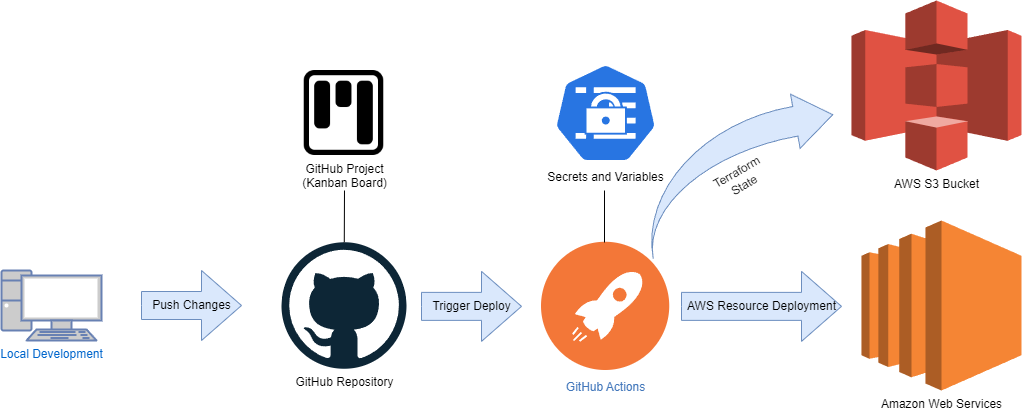
Now, let’s dive into the engine room of my infrastructure – the automated deployment process! To achieve seamless and reliable deployments, I’ve enlisted the help of two powerful tools: Terraform and GitHub Actions. Here’s a breakdown of how they work together:
-
1. Terraform Takes the Lead: All the nitty-gritty details of my infrastructure – the servers, the network settings, the software – are defined in Terraform configuration files. This "infrastructure as code" approach ensures consistency and makes it easy to manage changes over time.
-
2. GitHub Actions - The Deployment Maestro: I've set up dedicated pipelines in GitHub Actions to orchestrate the entire deployment process. These pipelines automatically validate my Terraform code and then deploy the resources to AWS.
-
3. Secrets and Variables: Keeping Things Secure: Sensitive information, like API keys and passwords, are securely stored as secrets and variables within GitHub Actions. This keeps my deployment process secure and prevents any accidental leaks.
-
4. S3 Bucket: The Statehouse: Terraform state files, which track the current state of my infrastructure, are stored in an AWS S3 bucket. This ensures that deployments are always consistent and traceable.
- 5. On-Demand Deployment: I've even added the ability to trigger builds and deployments manually, giving me complete control over when updates are rolled out.
This setup provides a robust and efficient way to manage my infrastructure. With Terraform and GitHub Actions working in harmony, I can deploy updates with confidence, knowing that everything is automated, secure, and reliable. It’s like having a dedicated team of experts managing my infrastructure 24/7!
2.2 A Cozy Home for My Apps: Docker and Friends
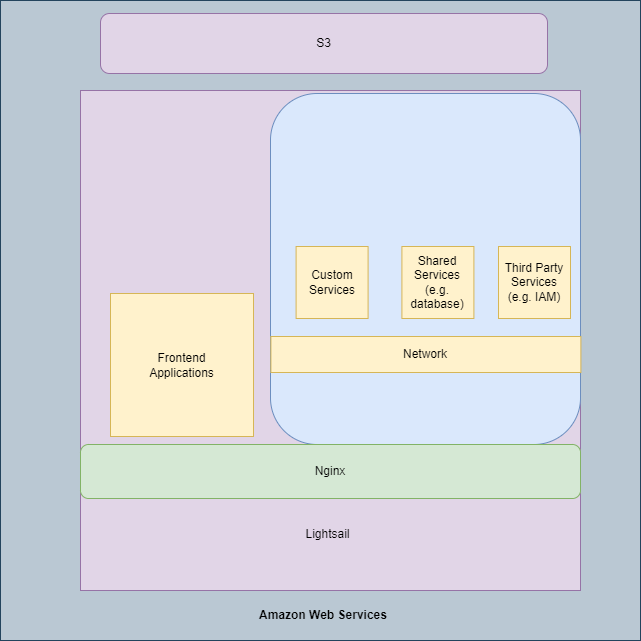
To keep things cost-effective, I’ve decided to house all my applications under one roof – a single AWS Lightsail instance. But don’t worry, they’re not all crammed into one room! Each application lives in its own cozy Docker container, which keeps them nicely isolated and prevents any conflicts. Think of it like giving each app its own mini-apartment within a larger building.
Now, here’s the real beauty of using Docker: it eliminates those pesky software compatibility issues. Since each application comes bundled with everything it needs within its container, I don’t have to worry about installing different versions of software on the server itself. No more headaches trying to find the perfect match between the application, its dependencies, and the operating system!
So, to recap, my infrastructure is like a well-organized apartment building with these key features:
- 1. The Building: An AWS Lightsail instance with a public IP address, providing a home for all my applications.
- 2. The Concierge: An Nginx reverse proxy, efficiently routing requests to the correct application.
- 3. The Apartments: Docker containers, providing isolated environments for each application.
- 4. The Utility Room: A dedicated Docker image housing all the essential third-party services, like databases and message brokers, that my applications need to function.
This setup provides a streamlined, efficient, and cost-effective solution for hosting my portfolio applications. It’s a testament to the power of containerization and automation!
3. Leveling Up: The Future of My Infrastructure
While my current setup is pretty slick, I’m always looking for ways to improve! Here are a few ideas brewing for the future, taking IaC and automated deployments to the next level.
3.1 Centralized Logging and Monitoring
Right now, I don’t have a central hub for all my logs and metrics. But I’m eyeing AWS CloudWatch to gather this data from all my resources. Imagine a system that seamlessly integrates with my infrastructure repository, collecting logs and displaying them in a centralized dashboard. This would make monitoring a breeze, simplify debugging, and even open doors for automated alerts and reports. Talk about proactive maintenance!
3.2 Terraform Automation for Everyone
With my infrastructure defined as code, I could create a user-friendly tool that automatically generates and updates those Terraform configuration files. Think of a graphical interface where even non-technical users can easily create and manage AWS resources without writing a single line of code. This would democratize infrastructure management and empower everyone to build and deploy with ease.
3.3 Dynamic and Extensible Codebase
Remember how I mentioned those scripts for installing Nginx and Let’s Encrypt? Currently, they run manually. But I envision a more dynamic system where these scripts are integrated directly into my Terraform code. Developers could simply specify (using HCL language) whether they want Nginx installed on a particular resource, and voila! – automation takes care of the rest. This would enhance code reusability and further minimize manual intervention.
These are just a few ideas I’m exploring to elevate my infrastructure game. It’s all about continuous improvement, finding new ways to streamline processes, and making my infrastructure even more robust, scalable, and user-friendly. Stay tuned for future updates!
4. Building for the Future
That wraps up our tour of my portfolio infrastructure! From the foundation of AWS Lightsail to the streamlined deployment process powered by Terraform and GitHub Actions, I’ve aimed to create a system that’s not only robust and efficient but also a reflection of my passion for automation and best practices.
This project has been a fantastic learning experience, and I’m excited to continue evolving this infrastructure. Whether it’s implementing centralized logging, creating user-friendly tools for managing resources, or further enhancing the flexibility of my codebase, I’m committed to pushing the boundaries of what’s possible.
Ultimately, this infrastructure isn’t just about hosting my portfolio – it’s about building a foundation for future projects and showcasing my skills as a developer. I hope this deep dive has provided some valuable insights and inspiration for your own infrastructure journeys. Thanks for reading!